← adnan.world

case study / replix · the app

Replix: demo videos that come from your code, so they don't go stale after every release

I designed a desktop app that turns a developer's codebase into a demo video, planned before anything is recorded.

concept prototype · desktop app · 2026 · 3–4 weeks · solo designer

Try the prototype

01 · the story

The demo is always one release behind

who faces it

Sam builds and ships her product alone. There's no marketing team, so when launch day comes, the demo video is her job too.

the problem

  • At 1:04 a.m. she's on take fourteen, because the cursor slipped again.
  • Two releases later, the demo on her homepage still shows the old dashboard.
  • A customer asks where a button is; it's in the video, but not in the app anymore.
  • The version that went live showed a real customer's email the whole time.

Every release makes the last demo a little more wrong, and the person who could fix it is busy shipping the next one.

Teams already pay tools like Clueso $120–$200 a month to polish screen recordings, but every one of those tools still needs someone to record the screen first.

why I designed it this way

So I didn't design a better recorder. I designed Replix to start where Sam already is: her code. It runs on her machine with her own AI key, plans the video with her, and records only after she approves the plan. Tools like Clueso, Trupeer, Screen Studio, Arcade and Supademo compete on polishing recordings; Replix doesn't need one. The trade-off: a smaller audience, and a privacy promise I have to make checkable.

02 · the app, screen by screen

Sam makes her demo in one sitting

Each clip below is recorded from the working prototype.

Start with the code, not a link

sam

It's late, and she doesn't want to set anything up. She just drags her project folder in.

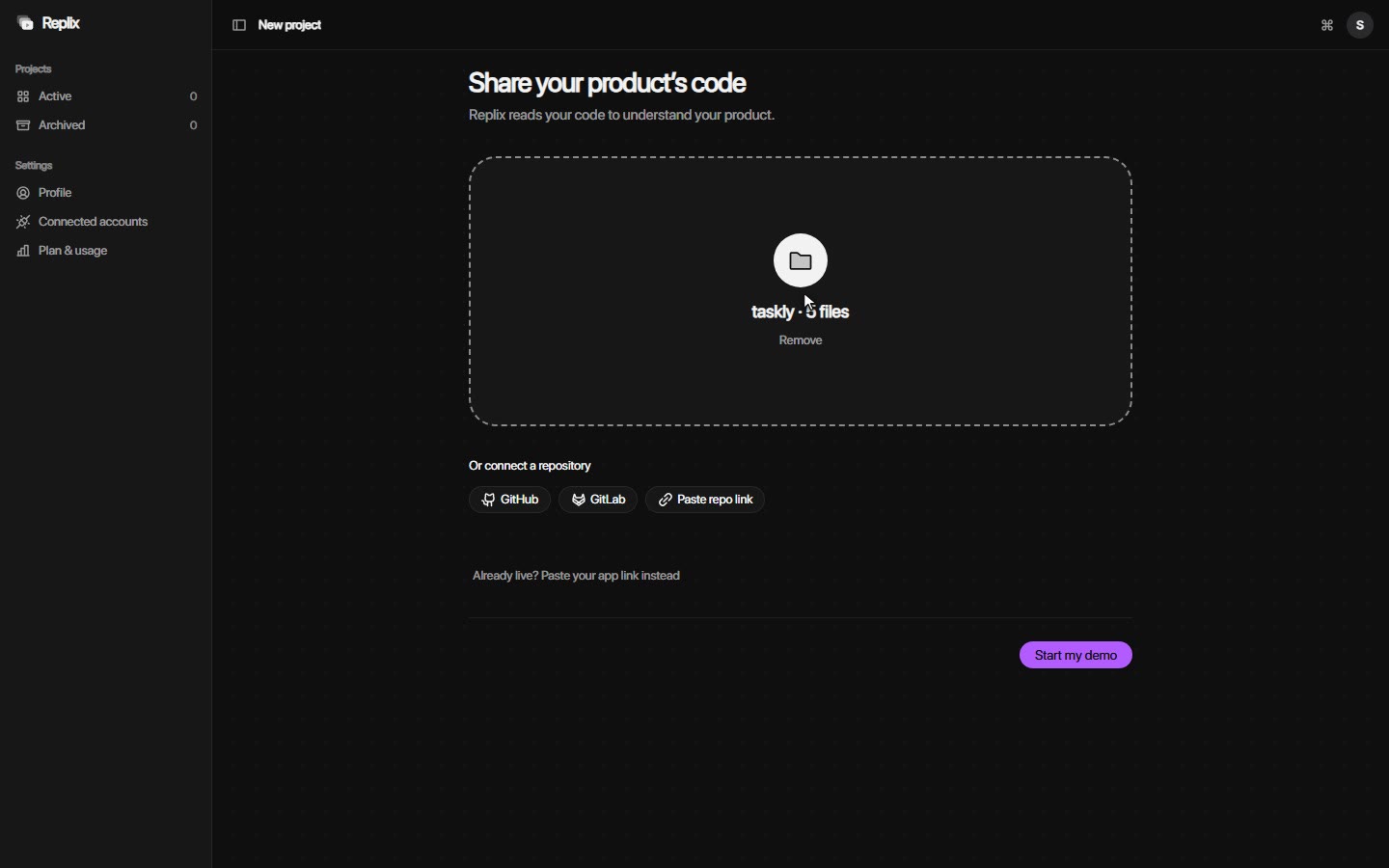
  1. 1 the dropzone
  2. 2 "Already live? Paste your app link instead"
  3. 3 "Start my demo"
what it does
The developer drops their project folder (or a ZIP, or connects a repository) and presses "Start my demo".
why this way
A developer friend pointed out that when you're making a demo, the product usually isn't live yet. I chose code first and kept the link as a small fallback; getting the code running to record it is the hardest technical problem in the product. The button names the goal: a demo, not an analysis.
Show what was understood before planning anything

sam

She watches the log fill line by line and wonders whether it really understood her app.

  1. 1 the live log
  2. 2 "14 screens · 8 features · 6 flows"
  3. 3 star and hide
what it does
A log fills line by line, then Replix shows the screens, features and flows it found. The developer stars what matters and hides what shouldn't appear.
why this way
This is the first moment of trust. Showing the understanding, and letting the developer correct it, comes before Replix plans anything.

Suggest a plan, or just type one

sam

She isn't sure what video she even wants, only that it has to be ready by morning.

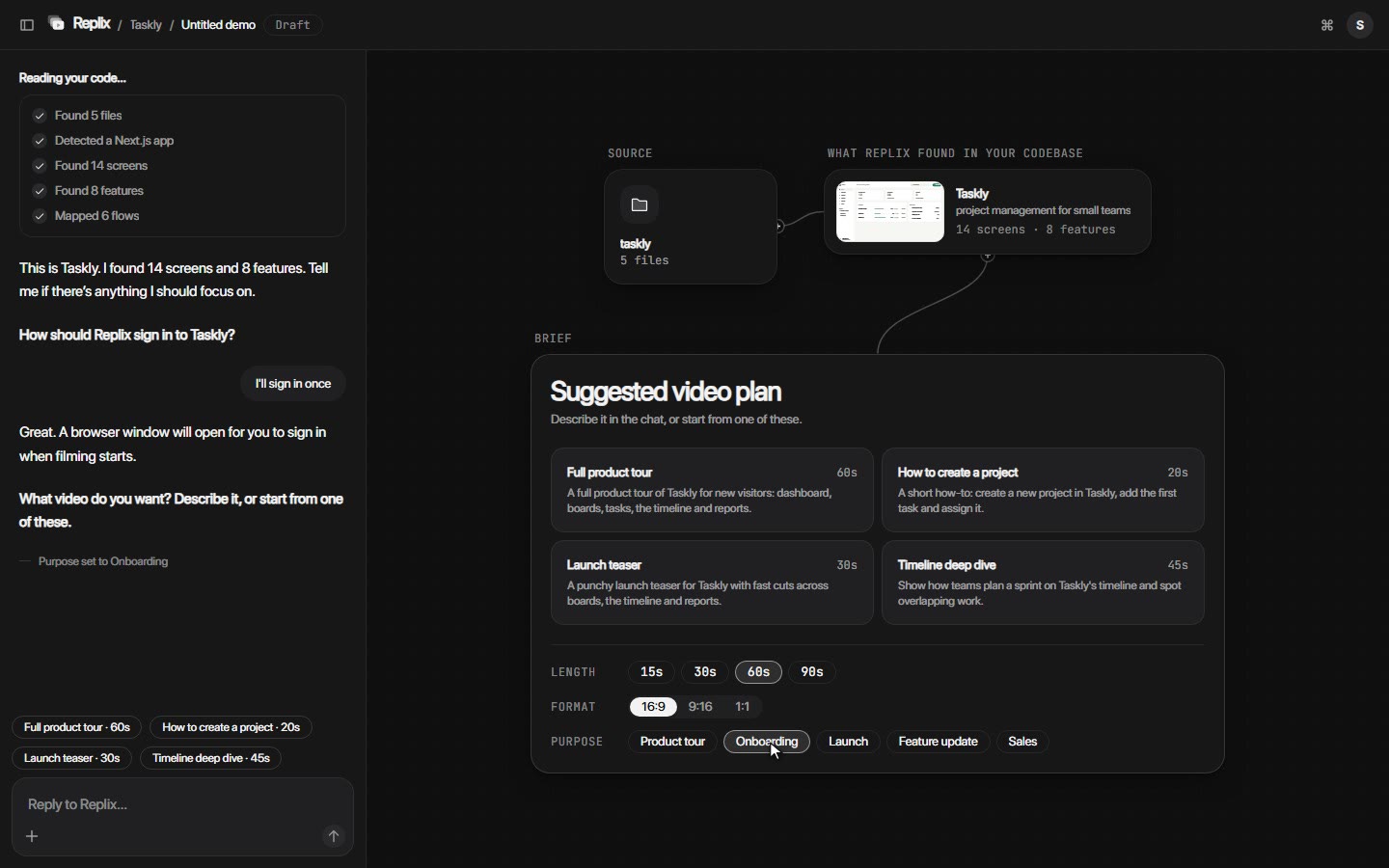
  1. 1 suggestion cards
  2. 2 length, format and purpose
  3. 3 the "Next:" hint
what it does
Replix suggests videos based on the product's features. The developer picks one, adjusts length and format, or describes the video in the chat.
why this way
A developer who isn't sure what video they want gets a starting point from their own product; one who knows can simply type it.

See the whole video before anything is recorded

sam

This is where she relaxes: she can watch the whole video before a single second is recorded.

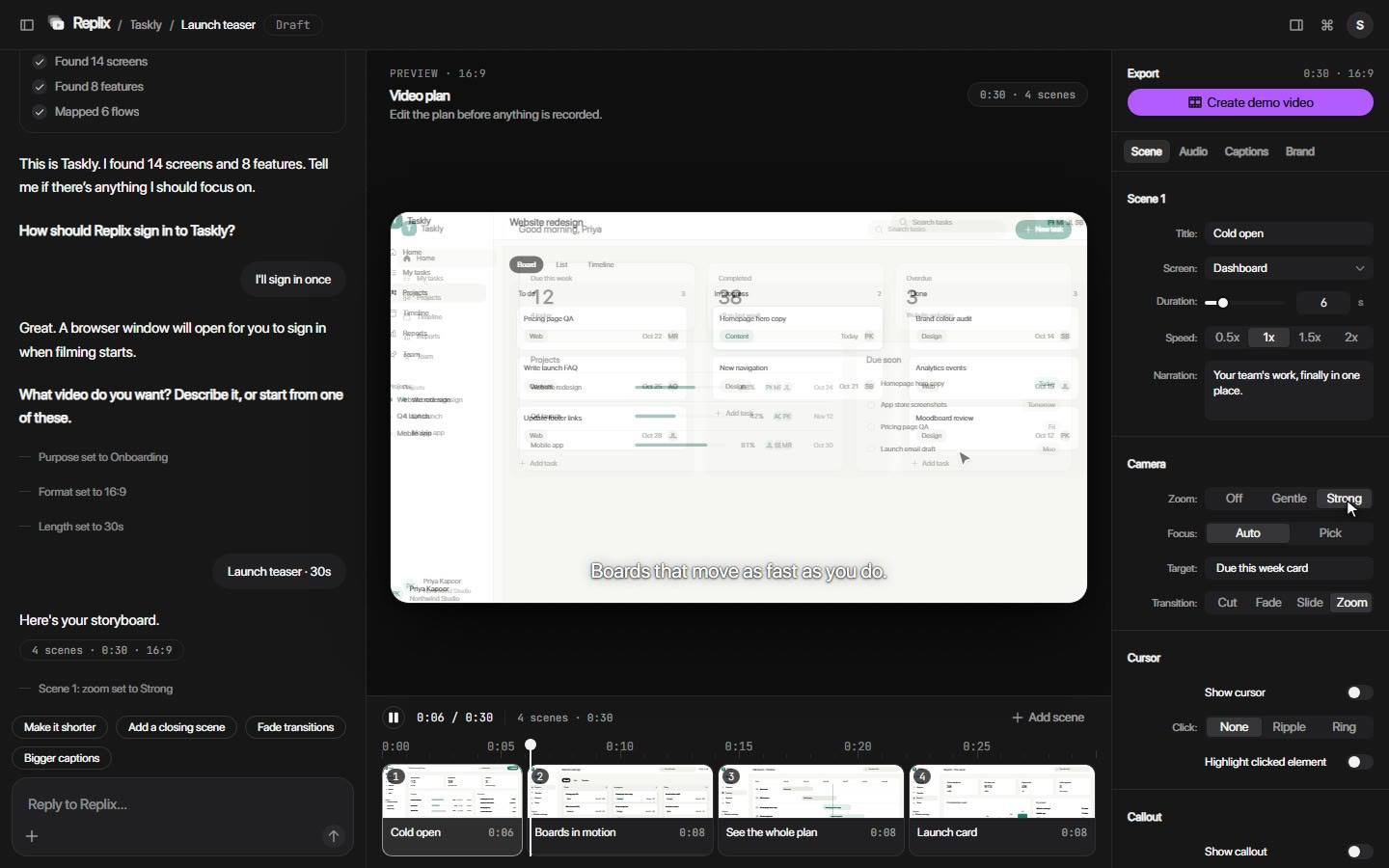
  1. 1 live preview
  2. 2 timeline of scenes
  3. 3 per-scene controls
  4. 4 "Create demo video"
what it does
The plan plays in a live preview with every effect applied. Each scene has its own controls, and values Replix picked are marked "Set by Replix" until the developer changes them.
why this way
Recording is the slow, expensive part. I compared recording straight away, a plan as static cards and a plan with a live preview, and chose the live preview so problems get caught before recording, when fixing them is quick.

One conversation from start to finish

sam

She never has to wonder where she is or what to press next.

  1. 1 steps row in the chat
  2. 2 a chat event line
  3. 3 quick replies
what it does
The chat is fixed on the left from the moment code is shared. Every action can be typed or clicked, and clicks appear in the chat as small event lines.
why this way
Early builds had a full page per step, and the next action was easy to miss. A pure chatbot would make editing slow. Chat plus canvas keeps one thread while still letting people work directly on the plan.

Know it's working, then know what to do next

sam

She watches each scene tick by, so she knows it's working, then downloads the video and sees what to do next.

  1. 1 progress log
  2. 2 scene checkmarks
  3. 3 Get other sizes
  4. 4 Share a link
  5. 5 Keep it up to date
what it does
A log ticks through each scene while the video is made. After download, the ready screen offers other sizes, a private share link and keeping the demo up to date.
why this way
The download isn't the end of the developer's job; they made the video for a launch or a website. The ready screen helps them finish that job.

When the code changes, fix the scene, not the whole video

sam

Two releases later her app changes, and this time she only has to fix one scene, not start over.

  1. 1 the alert
  2. 2 "What changed since last time"
  3. 3 the versions list
what it does
When the code changes, Replix says which scenes broke and shows the current and updated scene side by side. Approving saves a new version, and earlier versions stay.
why this way
A demo going stale is the problem Replix exists to solve. Updating one scene instead of remaking the video closes the loop back to the code.

03 · the detail

Onboarding

tried:
Centred illustrations across three slides.
why it didn't work:
It felt like any app's onboarding and showed nothing of how Replix works.
what I kept:
Three short screens, one idea each.
tried:
A 3D sphere of flowing strands.
why it didn't work:
Striking, but a sphere says nothing about code or video.
what I kept:
The 3D glass style, with every scene showing one real step of the product.
final:
Code files scanned by a light sheet, screens merging into one video, then that video playing.

Accent colour

  • Create demo videopurple #7C5CFF
  • Create demo videoamber #F5B544
  • Create demo videoorchid #B25CFF (about 3.6:1)
  • Create demo videodeeper orchid #9B3FEF (about 4.8:1) · final
tried:
Purple, then amber.
why it didn't work:
Purple read as the blue-violet many AI products share. Before committing to amber, I compared what tools like Runway, Linear, Descript and Loom actually use.
what I kept:
A monochrome interface with one joyful accent.
tried:
Orchid #B25CFF.
why it didn't work:
White text on it reached only about 3.6:1 contrast.
what I kept:
The hue, deepened to #9B3FEF: about 4.8:1, used only on the main action of each screen.

  • background#0F0F10
  • panel#171718
  • surface#202022
  • text#F2F2F2
  • muted60%
  • accent#9B3FEFhover #8C34E3pressed #7B28CF
  • One accent, one meaning. Only the main action uses the accent: Start my demo, Looks right, Create storyboard, Create demo video, Download. Selected items, tabs, progress bars and the playhead are white.
  • Capsules. Buttons, chips, segmented controls and inputs share one pill shape across every screen.
  • Glass for explanation, not for work. 3D glass appears only in onboarding; working screens stay flat.
  • Logo. Three stacked rounded rectangles, the front one with a play-shaped cutout: layers of screens becoming a video.
  • Accessibility and motion. WCAG AA contrast, visible focus, full keyboard use, checked at nine widths from 320px to 1920px. Animations run only while visible and respect reduced motion.

type · system font (SF Pro) · tokens.css

spacing · 8pt grid · tokens.css

How AI was used. Claude Code wrote the code from my specs. I used Claude to research, compare options and pressure-test decisions with an LLM council. The product, flows, interface, visual and copy decisions were mine.

  • Specs, not suggestions. My early prompts left choices open ("for example", "if available"), and Claude Code filled the gaps with its own guesses. Once I wrote decisive specs, with exact values, exact copy and checks it had to pass, the builds matched the design. I started treating each prompt like a handoff spec for a developer.
  • Impressive isn't the same as clear. The sphere and a looping "mini reel" looked good in isolation but explained nothing. I kept only animations that teach one step of the product.
  • Positioning shapes every screen. Repositioning Replix for developers changed words on screens I thought were finished. Next time I'd map the category before designing the first screen.

What's next

  • Get real code running to record it, the hardest technical question in the product.
  • Meet developers where they work: a command-line tool, a Git hook, and a Claude Code or Cursor plugin.
  • Make the privacy promise checkable by open-sourcing the local engine or recorder.
  • Validate demand with developers who ship their own products.

Why I made Replix a developer tool instead of another launch-demo tool

Hook. When I mapped the AI product-demo tools, the answer was uncomfortable: turning a product into a polished demo video is, broadly, a solved problem.

Before. My first framing was "turn the feature you just shipped into a polished launch demo", and the landing page said "Product demos, without recording a thing."

Product demos, without recording a thing.

Before

You shipped it. Replix shows it.

After

Turning point. Compete on features (a race on established tools' ground), pitch an abstraction ("a demonstration layer for software"; nobody downloads an abstraction), or change who it's for and how it's delivered (smaller audience, a privacy promise to make checkable, unproven willingness to pay). I chose the third, because every tool I checked starts from a screen recording.

What I did next. Narrowed V1 to one path, renamed the interface in words a developer would use, and set the headline direction "You shipped it. Replix shows it."

Result. Replix aims at a category it can realistically lead: demo videos made from the code, by the person who wrote it.

Why the codebase comes first

Hook. A developer friend said it plainly: when you're making a demo, the product usually isn't live yet.

Before. The share screen led with a URL field; the code options were a small, optional row.

Before
After

Turning point. URL first is easiest to film but shuts out everything not yet deployed. Code first works before launch, at the cost of the hardest technical problem: running the code to record it. I chose code first, with the link as a fallback.

What I did next. A large dropzone, repositories in a row below it, the URL as a small link, and "Start my demo" instead of "Analyze my product".

Result. The first screen matches who the product is for.

Why nothing is recorded until the plan is approved

Hook. Recording is the slow, expensive part.

Before. The original idea was a straight line from prompt to recording; the first storyboard was a row of static cards.

  1. Cold open
  2. Boards in motion
  3. See the whole plan
  4. Launch card
Before
After

Turning point. Record straight away, plan as cards, or plan with a live preview. I chose the live preview, so problems are caught before recording.

What I did next. "Storyboard" became "Video plan", with a live preview, a timeline, per-scene controls marked "Set by Replix", and "Add scene".

Result. The only button that records comes after the user is happy with the plan.

Why the chat never leaves the screen

Hook. Clicking through the early build, I kept asking: where am I, and what do I press next?

Before. A full page per step, a stepper across the top, and a chat that appeared only halfway through.

  1. 1
  2. 2
  3. 3
  4. 4
  5. 5
Before
After

Turning point. A wizard loses context, a pure chatbot makes editing slow, and chat plus canvas keeps one thread with direct editing. I chose chat plus canvas.

What I did next. The chat is fixed on the left, the steps live inside it, clicks are echoed as chat lines, answers appear as quick replies, and each step has one highlighted button.

Result. One screen from shared code to downloaded video, always with one clear next step.

04 · try it

Go from shared code to a finished demo in a few minutes

The prototype runs on sample data.

Try the prototype